
Quick Maintenance & Backup for MS SQL
Connecting to Yandex Disk
| Database maintenance settings > Copying backups > Connecting to Yandex Disk |
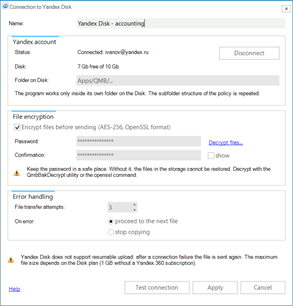
This form includes settings for connecting to Yandex Disk. It opens when you create a connection of the Yandex Disk type in the copy destination settings and in Settings > Connections.
Connecting to Yandex Disk |
Name - any name for the connection.
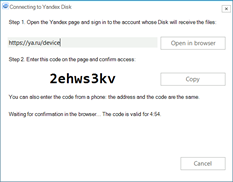
Status - whether the account is connected. Click Connect…: a window with the address of a Yandex page and a confirmation code opens.
Confirming access to Yandex Disk |
Open the page on this computer or on your phone, sign in to the account whose Disk will receive the files, enter the code and confirm the access. After the confirmation the QMB service tests the connection and shows the login and the Disk space. The account password is not stored in the program: Yandex issues the program a separate access key, which you can revoke on your Yandex account page. The Disconnect button revokes the access key issued to the program in Yandex and erases it in QMB; to connect again you will have to go through the connection procedure once more.
Disk - free and total space on the Disk according to the last connection test.
Folder on Disk - Apps/QMB (the system folder is named according to the interface language of the Yandex account, for example Приложения for Russian). The program works only inside its own folder on the Disk and cannot access other files. The policy folder structure is repeated inside: database folders with the FULL, DIFF and LOG subfolders.
Encrypt files before sending (AES-256, OpenSSL format) - the files are encrypted during the transfer and stored on the Disk with the .enc extension; the source files on the computer are not changed. Enter a Password of at least 8 characters and repeat it in the Confirmation field; the show check box reveals the entered password.
 |
Keep the encryption password in a safe place. Without it, the files in the storage cannot be restored. Decrypt with the QmbBakDecrypt utility (the Decrypt files… link on the form) or with the openssl command. |
|
Attention! Yandex significantly reduces the upload speed for encrypted files. |
File transfer attempts - how many times to retry the transfer of one file after a failure, from 1 to 10.
On error - what to do when a file could not be transferred: proceed to the next file or stop copying. In both cases the error is written to the task log.
Test connection - the test connection is made from the computer where the QmbService service is installed, through its Internet access and its proxy. The result is the login and the free space on the Disk.
Copying is performed by the Backup copying to Yandex Disk job task, see Settings for Copying Backup Files.
 |
Yandex Disk does not support resumable upload: after a connection failure the file is sent again. The maximum size of one file depends on the Disk plan: 1 GB without a Yandex 360 subscription. |