
Quick Maintenance & Backup for MS SQL
Decrypting Backup Files
| Database maintenance settings > Copying backups > Decrypting Backup Files |
The QmbBakDecrypt utility decrypts the files encrypted by the program during copying (with the .enc extension), for example Northwind_FULL_2026-09-10.bak.enc. The utility file QmbBakDecrypt.exe can be run on its own (by default C:\Program Files\Qmb\QmbBakDecrypt.exe), including from the command line, or started directly from the program: from the context menu of a server in the tree (the Decrypt backup files item), from Settings > Connections and by the Decrypt files… link on a connection form.
The general procedure for restoring databases from encrypted files:
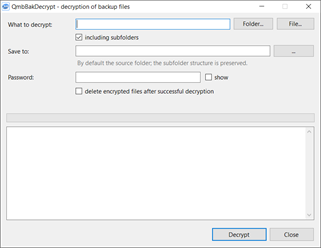
Decrypting backup files |
What to decrypt - an encrypted file (the File… button) or a folder with files (the Folder… button); the including subfolders check box extends the search to nested folders. Files without the .enc extension are skipped.
Save to - the folder for the decrypted files; by default the source folder is used, and the subfolder structure is preserved. The name of a decrypted file is the source name without .enc; an existing file with that name is replaced.
Password - the encryption password specified in the connection; the show check box reveals the entered password.
The Decrypt button starts the work. During decryption the progress and the result for each file are written to the log at the bottom of the window; while the work is running, the same button stops it.
 |
If a wrong password was specified, this becomes known only at the end of decrypting a file: you get the message "wrong password or corrupted file". The intermediate decryption result is deleted automatically. |
The utility can be run from the command line with parameters, which makes it possible to use it in the program's jobs, for example for automated decryption.
QmbBakDecrypt.exe -in <file|folder> [-r] [-out <folder>] [-p <password>] [-delete] [-lang ru|en]
-in - a file or a folder; -r - including subfolders; -out - the destination folder (by default next to the source files); -p - the password (prompted for if omitted); -delete - delete the source files after successful decryption; -lang - the language of the messages. Return code 0 means that all files have been decrypted successfully.
The files are encrypted in the OpenSSL format (AES-256-CBC, the key is derived from the password by PBKDF2 with 100000 iterations), so they can also be decrypted on any computer with OpenSSL:
openssl enc -d -aes-256-cbc -pbkdf2 -iter 100000 -in Northwind_FULL_2026-09-10.bak.enc -out Northwind_FULL_2026-09-10.bak