
Quick Maintenance & Backup for MS SQL
Connecting to an FTP Server
| Database maintenance settings > Copying backups > Connecting to an FTP Server |
This form includes settings for connecting to an FTP or FTPS server. It opens when you create a connection of the FTP type in the copy destination settings and in Settings > Connections.
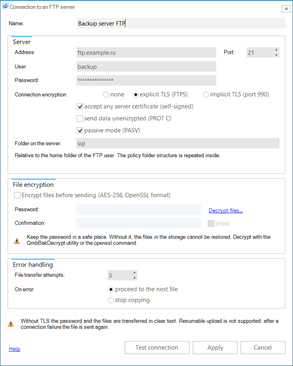
Connecting to an FTP server |
Name - any name for the connection.
Address and Port - the name or IP address of the FTP server and the port: 21 for plain FTP and explicit TLS, 990 for implicit TLS. When you switch the encryption mode, the default port is substituted automatically.
User and Password - the account on the FTP server.
Connection encryption:
Accept any server certificate (self-signed) - do not validate the server certificate. Enable it if the FTP server uses a self-signed certificate.
Send data unencrypted (PROT C) - encrypt only the control connection and transfer the files in clear text. Needed for servers that require TLS session resumption on the data channel (the default configuration of vsftpd, ProFTPD and FileZilla Server): in the task log this is an error like "the server requires TLS session resumption on the data channel". The password stays protected in this mode, and the file contents are protected by file encryption (see below). The other ways out are to disable the requirement on the server (for vsftpd, require_ssl_reuse=NO) or to use SFTP.
Passive mode (PASV) - the data connections are opened by the program; works through firewalls and NAT, recommended. Without it the server connects to the QMB service computer itself, which requires allowed incoming connections.
Folder on the server - the folder for the files relative to the home folder of the FTP user; an empty value means the home folder itself. The policy folder structure is repeated inside: database folders with the FULL, DIFF and LOG subfolders.
Encrypt files before sending (AES-256, OpenSSL format) - the files are encrypted during the transfer and stored on the server with the .enc extension; the source files on the computer are not changed. Enter a Password of at least 8 characters and repeat it in the Confirmation field; the show check box reveals the entered password.
 |
Keep the encryption password in a safe place. Without it, the files in the storage cannot be restored. Decrypt with the QmbBakDecrypt utility (the Decrypt files… link on the form) or with the openssl command. |
File transfer attempts - how many times to retry the transfer of one file after a failure, from 1 to 10.
On error - what to do when a file could not be transferred: proceed to the next file or stop copying. In both cases the error is written to the task log.
Test connection - the test connection is made from the computer where the QmbService service is installed: logging in to the server and reading the file list in the specified folder or in the default folder.
Copying is performed by the Backup copying to FTP/SFTP job task, see Settings for Copying Backup Files.
 |
Without TLS the password and the files are transferred in clear text. Resumable upload is not supported: after a connection failure the file is sent again. An existing file with the same name on the server is replaced. |